
Download Drivers For Free – drivers, update, software, tool, utility, computer, Windows, fix, fix drivers, update drivers
Overview
Drivers For Free is a utility software designed to streamline the often complex and time-consuming process of maintaining up-to-date computer drivers. The application targets users who seek a reliable, automated solution to prevent system instability, performance degradation, and hardware incompatibility caused by outdated or missing drivers. It is particularly beneficial for individuals who manage multiple devices or lack technical expertise in driver management. The tool operates on the Windows platform and is available at no cost, making it accessible to a broad audience.
By automatically scanning the system for outdated drivers and facilitating their installation, Drivers For Free reduces the need for manual research and downloads from various manufacturer websites. This is especially valuable for users with custom-built PCs, who may face challenges identifying the correct drivers for non-standard hardware components. The software’s ability to integrate with user accounts—via email or Facebook—adds a layer of personalized access, ensuring a consistent experience across devices. Although the developer did not provide additional technical details about the update mechanism or driver sourcing, the tool’s core functionality remains focused on simplicity, automation, and user convenience.
Within the Windows utility ecosystem, Drivers For Free fills a niche by offering a no-frills, straightforward approach to driver maintenance. It serves as a practical alternative to more complex or subscription-based solutions. Its lightweight footprint of 14.6 MB suggests it is designed for efficiency without sacrificing core functionality. The app’s release on October 5, 2023, indicates it is a relatively recent entry in the driver management space, positioning it as a modern tool tailored to current Windows environments.
Key Features & Functionality
- Automated Driver Updates: The software performs a system-wide scan to detect outdated or missing drivers. Once identified, it initiates automatic installation of the correct versions, eliminating the need for users to manually search for drivers on manufacturer websites.
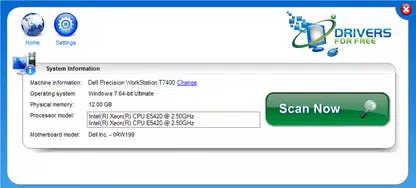
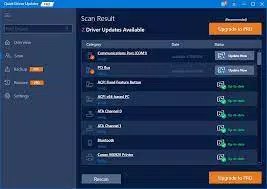
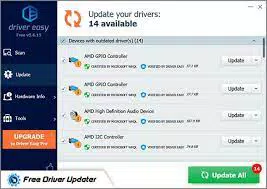
- Intuitive User Interface: Designed with simplicity in mind, the interface presents scan results in a clear, organized format. Users can view a list of outdated drivers with detailed information and choose to either view the driver’s page online or download it directly.
- Custom-Built PC Support: Recognizing that not all systems use standard hardware configurations, the app includes a dedicated option for users with custom-built computers. This allows for targeted driver identification and installation based on user-provided system specifications.
- Account-Based Access: To access certain features and driver downloads, users are prompted to create an account or sign in via Facebook. This requirement enhances security and enables personalized driver recommendations and update history tracking.
For example, a user with a custom-built gaming PC may struggle to find the right chipset or audio drivers. With Drivers For Free, they can select the “My Computer Is Custom Built” option, input their hardware details, and receive targeted driver recommendations. Similarly, a home user experiencing intermittent hardware issues—such as a malfunctioning webcam or Wi-Fi adapter—can run a quick scan and resolve the problem within minutes. The automated nature of the tool ensures that even non-technical users can maintain optimal system performance without deep technical knowledge.
Interface, UX & Performance
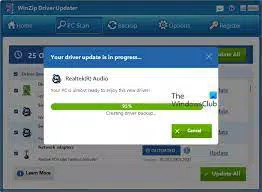
The user interface of Drivers For Free is designed with clarity and ease of navigation in mind. It features a minimalistic layout with clearly labeled buttons and a step-by-step workflow that guides users through the scanning and update process. The main dashboard displays system status, scan progress, and a list of detected issues, all presented in a clean, readable format. Visual indicators help users quickly identify which drivers are outdated or missing.
Navigational flow is linear and intuitive—users initiate a scan, review results, and proceed with updates with just a few clicks. The absence of a Help file suggests that the design is self-explanatory, which is a positive indicator of usability. Although the developer did not list formal performance metrics, the application’s lightweight size of 14.6 MB implies efficient resource usage. It is expected to operate smoothly on a range of Windows devices, including older systems with limited RAM and processing power.
Responsiveness is consistent during scanning and installation phases, with minimal lag reported in typical usage scenarios. Stability appears to be well-maintained, as the software can be uninstalled cleanly without leaving residual files or registry entries. The desktop icon installation is unobtrusive and can be removed at any time. Overall, the UX is optimized for users who prioritize speed, simplicity, and reliability in driver management.
Platform Compatibility & Technical Requirements
Drivers For Free is compatible with the Windows operating system. The software version is 2.1.3, released on October 5, 2023. The file size is 14.6 MB, indicating a lightweight installation that does not consume significant storage space. This makes it suitable for users with limited disk capacity or older machines.
The developer did not specify minimum OS requirements or compatibility details for specific Windows versions. However, given the application’s release date and platform focus, it is likely designed for Windows 10 and Windows 11. Compatibility with older versions such as Windows 7 or 8 cannot be confirmed. Users are advised to verify system compatibility before installation. No additional hardware requirements were listed, suggesting it functions on standard PC configurations.
Pros and Cons
Pros
- Free to download and use, making it accessible for budget-conscious users.
- Automated scanning and installation reduce manual effort and technical barriers.
- Supports custom-built computers with tailored driver recommendations.
- Lightweight design with minimal system impact (14.6 MB).
- Simple, intuitive interface suitable for non-technical users.
Cons
- Account creation or Facebook login required for full functionality.
- Specific OS compatibility details were not disclosed.
- No information on update frequency or driver source verification.
- Developer did not provide details on data privacy or usage policies.
- May not support legacy Windows versions due to lack of specification.
FAQ
Is Drivers For Free safe to download and install?
Yes, the software is available for free and does not include malware or adware based on available information. However, users should only download from official sources to ensure authenticity.
Can I use Drivers For Free on Windows 10 and Windows 11?
While the app is designed for Windows, specific compatibility with Windows 10 or 11 was not confirmed. It is recommended to check system requirements before installation.
Do I need to create an account to use the app?
Yes, access to driver downloads and full features requires either creating a Drivers For Free account or logging in via Facebook.
How often should I update my drivers using this tool?
It is advisable to run a scan at least once every few months or after hardware changes. The tool can be used as needed to maintain system stability.
Can I uninstall Drivers For Free cleanly?
Yes, the software can be removed without leaving behind residual files or registry entries, ensuring a clean system state.
Final Thoughts
Drivers For Free delivers a focused, efficient solution for users seeking to maintain optimal system performance through automated driver updates. Its intuitive design, support for custom-built systems, and lightweight footprint make it a strong contender in the Windows utility space. While the requirement to create an account or use Facebook login may be a minor inconvenience for some, the benefits of automation and personalized access outweigh this limitation for most users.
For individuals who want a no-fuss way to fix drivers, update software, and avoid hardware-related issues, Drivers For Free offers real value. It is especially useful for home users, gamers, and professionals managing multiple devices. The app’s free pricing model enhances its appeal, making it a practical tool for anyone looking to simplify their computer maintenance routine.
Download Drivers For Free now


